
The Omnivore integration allows the client to create webhooks - Omnivore will call a remote endpoint of your choice and upload the data in the Omnivore data format.
For now the only webhook available is for a new order creation: when a new order is created in Omnivore ie downloaded by Omnivore from the marketplace, Omnivore will call the remote endpoint and upload the order data.
Omnivore expects a http response code in the 200 range to mean the webhook was successfully processed by the remote endpoint. Any other http response code is considered a failure and Omniovre will attempt to resend the webhook for a total of 10 times over the next hour.
Important Note
It is possible that Omnivore will resend a webhook that failed due to network errors or other errors not necessarily related to your receiver endpoint. If your code uses the Omniovre webhook payload to create orders in your system it is thus your responsibility to ensure uniqueness of orders based on marketplace code and order number.
The remote endpoint url can be entered in the configuration screen:
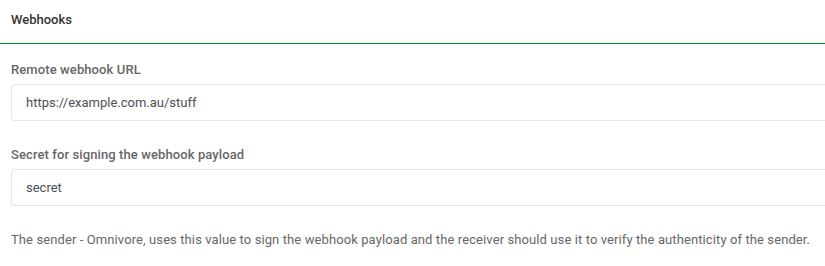
Optionally, if you enter a secret, this value will be used to sign the payload using hmac sha256 alogorithm as in the Java code example below.
The hmac signature is sent in an http header named X-OMNIVORE-HMAC-SHA256
Example Java code for signing the webhook payload
public static String computeHmacSignature(String payload, String secret) {
    Mac mac = Mac.getInstance("HmacSHA256");
    SecretKeySpec secretKey = new SecretKeySpec(secret.getBytes(StandardCharsets.UTF_8), "HmacSHA256");
    mac.init(secretKey);
    byte[] digest = mac.doFinal(payload.getBytes(StandardCharsets.UTF_8));
    return Base64.getEncoder().encodeToString(digest);
}
Example order created webhook payload
{
    "event_type": "ORDER_CREATED",
    "order": {
        "id": 262,
        "retailer_code": "test-store",
        "marketplace_code": "ebay",
        "order_number": "1234567890123-1234567890123",
        "alt_order_number": "12-34567-89012",
        "retailer_order_id": 12345,
        "retailer_order_number": "12345-ABC",
        "status": "created",
        "total_price": {
            "with_tax": "27.50",
            "without_tax": "25.00",
            "tax": "2.50",
            "currency": "AUD"
        },
        "additional_fee": {
            "amount": "0.00",
            "currency": "AUD"
        },
        "additional_tax": {
            "amount": "0.00",
            "currency": "AUD"
        },
        "customer": {
            "first_name": "John",
            "last_name": "Smith",
            "email": "john@example.com"
        },
        "billing_address": {
            "first_name": "John",
            "last_name": "Smith",
            "line1": "123 Beach St",
            "line2": "",
            "city": "Sydney",
            "state": "NSW",
            "postcode": "200",
            "phone": "0412345678",
            "country_name": "Australia",
            "country_code": "AU"
        },
        "shipping_address": {
            "first_name": "John",
            "last_name": "Smith",
            "line1": "123 Beach St",
            "line2": "",
            "city": "Sydney",
            "state": "NSW",
            "postcode": "200",
            "phone": "0412345678",
            "country_name": "Australia",
            "country_code": "AU"
        },
        "shipping": {
            "price": {
                "with_tax": "5.50",
                "without_tax": "5.00",
                "tax": "0.50",
                "currency": "AUD"
            },
            "carrier": null,
            "method": "AU_StandardDelivery",
            "tracking_code": null
        },
        "line_items": [
            {
                "id": 288,
                "product_sku": "TEST1",
                "variant_sku": "TEST1",
                "marketplace_sku": "TEST1",
                "name": "Test 1 Example Product",
                "unit_price": {
                    "with_tax": "11.00",
                    "tax": "1.00",
                    "currency": "AUD"
                },
                "quantity": 2,
                "delivery_amount": "0.00"
            }
        ],
        "transactions": [
            {
                "amount": "27.50",
                "currency": "AUD",
                "transactionId": "1234567890",
                "transaction_id": "1234567890",
                "type": "marketplace",
                "response_code": "200",
                "status": "Complete"
            }
        ],
        "customer_message": "If nobody is home, please leave at front door",
        "created": "2026-03-02T15:26:44+1100",
        "updated": "2026-03-06T17:12:56+1100",
        "created_in_marketplace": "2019-12-01T12:00:00+1100"
    }
}
The event_type is an enum with currently a single value: ORDER_CREATED.
The order data format is the same as the Order type defined in the Order api.
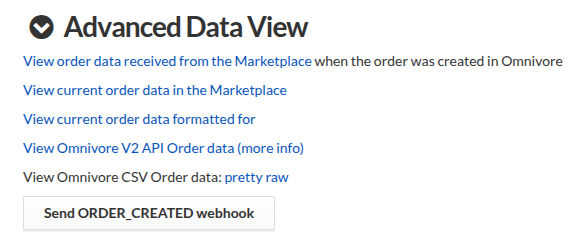
For testing and development purposes, the Omnivore order page has in the Advanced Data View section a button to exercise the ORDER_CREATED webhook:
~