
TABLE OF CONTENTS
- Product Approvals on JB Hi-Fi
- How Product Approvals Work
- Product Statuses
- Validation Errors and Rejections
- Making Changes to Rejected Products
- Recommended: Review JB Hi-Fi Requirements
Product Approvals on JB Hi-Fi
Before you can sell on the JB Hi-Fi Marketplace, JB Hi-Fi must approve the brands and products you’re allowed to list. This approval process is usually completed during your initial seller onboarding with the JB Hi-Fi team.
How Product Approvals Work
Once you have completed all the necessary setup steps to go live with Omnivore, and you start pushing live data to JB Hi-Fi, each product is checked before it becomes a live listing.
JB Hi-Fi will check items such as:
Product compliance and regulations
Brand approval
Variants
UPCs and product identifiers
Images
Pricing
Other required product data
Because of this review process, new products will not go live immediately. Instead, they will remain in a pending approval state until JB Hi-Fi completes their checks.
Product Statuses
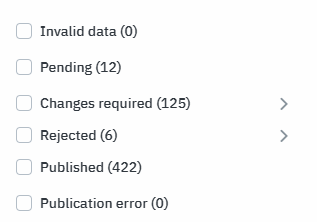
After you click Start Selling or add new products, JB Hi-Fi will assess the data and assign a status such as:
Pending
Changes Required
Rejected
Published
While products are being reviewed, you’ll see them in the Catalogue Manager section of the JB Hi-Fi Seller Centre, along with their current status.
Validation Errors and Rejections
If a product is not approved or rejected:
Omnivore may display a generic validation error (for example, “Product does not exist”).
The exact reason for rejection or required changes will be shown in JB Hi-Fi Seller Centre, as this is where the approval decision is made.
Omnivore does not manage the product approval process. For approval issues, you should contact JB Hi-Fi Marketplace Support or your JB Hi-Fi account manager.
Making Changes to Rejected Products
If JB Hi-Fi requires changes:
Review the Mirakl FAQs and JB Hi-Fi guidance first.
Take note of the exact changes or corrections required.
Contact the Omnivore Support team with the rejection details.
In many cases, Omnivore features can be used to adjust product data (such as titles, attributes, or identifiers) to meet JB Hi-Fi requirements, once the rejection reason is known.
Specifically when Images if are rejected:
Accepted image formats are PNG and JPEG.
For best results please allow/whitelist there Mirakl outbound IP Addresses on your image server/firewall:
34.234.7.99
52.22.5.15
34.197.206.27
Recommended: Review JB Hi-Fi Requirements
To list products successfully on JB Hi-Fi, it’s strongly recommended that you understand their marketplace rules and compliance requirements, as outlined in the JB Hi-Fi Seller Handbook.
During onboarding, your JB Hi-Fi contact may provide guidance on:
Content guides
Product compliance policies
Image specifications
Account requirements
Product descriptions
Product identifiers
Required attributes
Brand requirements
Key product features
Warranty duration
Ensuring these requirements are met will help your products be approved and listed more quickly.